Real app screens for demos, decks, and landing pages
Real EzeForge screenshots with supporting scripts and copy — build demo videos, landing sections, and sales material from one source set.
5 real screens
Overview, Ideas, Detail, Production, Publish Queue
Bilingual video kit
Thai and English scripts and subtitle files
Marketing-ready
Captions, social copy, and asset usage guidance
Featured asset
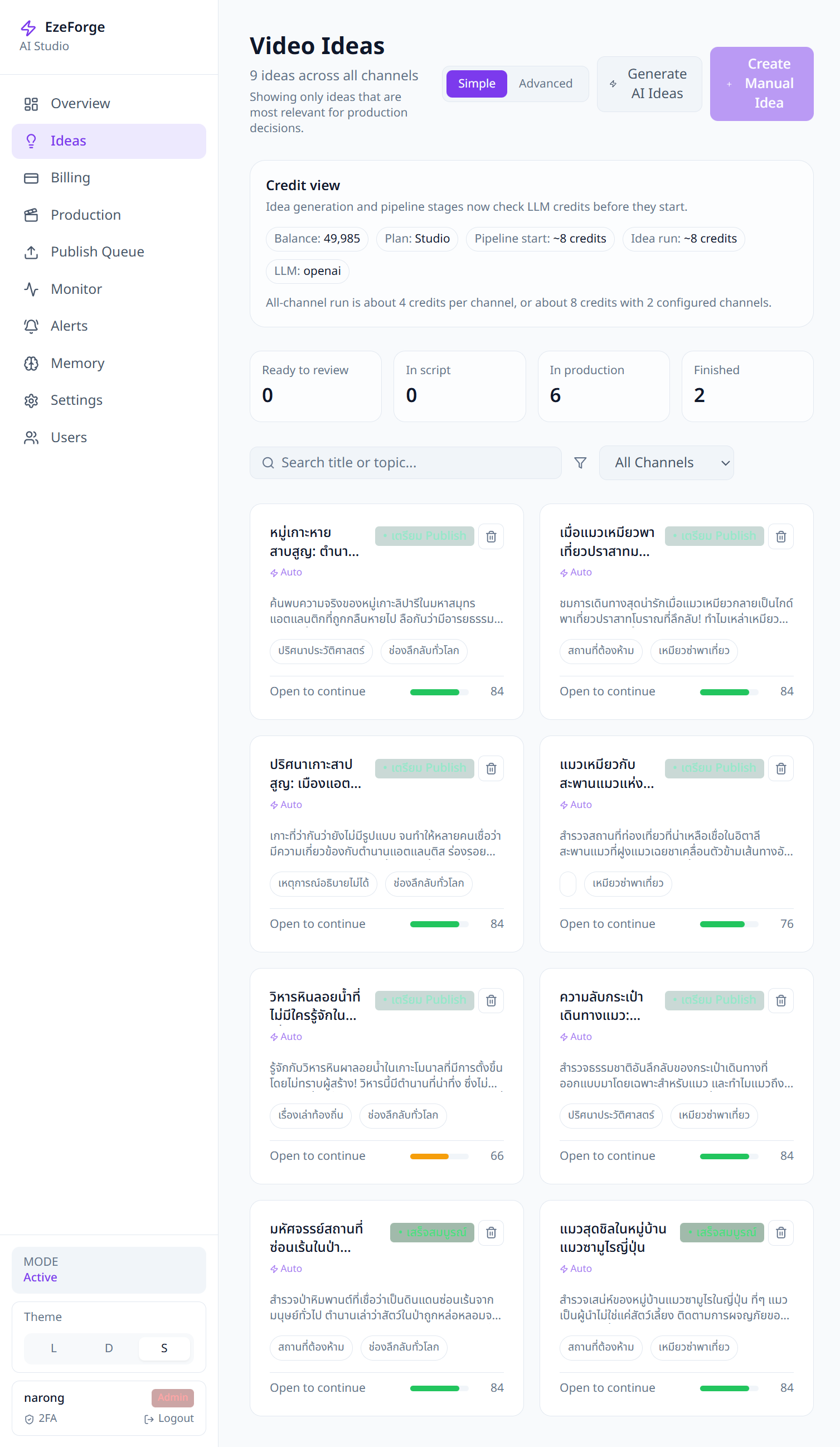
Ideas Workspace is the strongest product proof
If you need one screen to explain EzeForge quickly, use the Ideas Workspace. It shows that EzeForge generates AI ideas, organizes them across channels, and prepares them for production decisions.
Narrative angles
Topic to AI ideas
Show how EzeForge starts with a topic or channel direction and generates ideas before production begins.
Approve what works
Move the best ideas forward with structured review states, scripts, subtitles, and pipeline controls.
Produce and publish
Turn approved ideas into video workflows, then package them for publish-ready release.
Recommended story
- Step 1
Overview
- Step 2
Ideas Workspace
- Step 3
Idea Detail
- Step 4
Production
- Step 5
Publish Queue
Use this for
Landing page proof
Use the Ideas Workspace and Overview screens to show the product quickly without explaining the full app.
Sales deck flow
Lead with Overview, prove AI generation with Ideas Workspace, then use Idea Detail to show workflow depth.
Short demo video
Follow the 5-step story from Overview to Publish Queue with the included script and subtitle files.
Asset gallery
Every screen, ready to use
Dashboard
Overview
High-level product proof showing ideas, production, and completed output in one AI Studio dashboard.
AI Ideas
Ideas Workspace
The clearest screen for AI idea generation, channel-based organization, and review readiness.
Pipeline Detail
Idea Detail
Deep workflow proof — pipeline status, script structure, scenes, subtitles, and approvals.
Production
Production
How approved ideas move into video generation, timing, and rendering workflows.
Publish
Publish Queue
Closes the loop — release readiness and final packaging before publishing.